Why nothing sends without your approval
Istos could send on its own. It doesn't, by design. Here's why every draft waits for you, and exactly what happens when you press approve.
The first question people ask when they see Istos is some version of "can it just send them?" It's a fair question. The agents find the role, the buyer or the investor, write the note and know the address. Sending is one more step.
It doesn't take that step. Not on any plan, not as a hidden setting, not for "trusted" drafts. Every message an agent writes waits in your queue until you approve it. This post is about why I built it that way, and what actually happens between approve and sent.
Your name is on every message
When I went back to the job market in September, I looked at the tools that apply for you. Some will send hundreds of applications a day. I understand the appeal. Applying had become a full-time job, and anything that gives you your evenings back is tempting.
But every one of those applications has your name on it. So does every cold email and every investor intro. The person reading it doesn't know an agent wrote it. They just know you sent it. If it gets a fact wrong, pitches the wrong thing or lands on someone who never should have heard from you, that's your reputation, not the software's.
An agent can be very good and still be wrong in ways that matter: a role that closed yesterday, a founder who just left, a number from your resume that's out of date. You'll catch most of those in ten seconds. Software won't, because it doesn't know what it doesn't know.
Volume isn't the goal
A tool that sends without asking has one obvious lever: more. More applications, more emails, more sequences. It's easy to build and easy to sell.
Most of the people you want to reach can tell. Hiring managers see the same cover letter fifty times. Founders get a dozen "quick question" emails a day. When everything is automated, the thing that stands out is a note that was clearly read by the person who sent it.
So Istos spends its effort before the send. It checks a job against the company's own site and flags likely fakes. It scores a lead against what you told it matters. It writes from your own documents and your own rules. Then it hands the decision to you, with the reason the draft was written.
What happens when you press approve
Here's the whole path, with nothing left out:
- An agent findsA role, a lead or an investor, with the reason it fits.
- It draftsFrom your knowledge and voice rules. The draft lands in the queue.
- You read and editAny word, the subject, the recipient. Or reject it.
- You approveOnly now can it be sent.
- It sends as youFrom your own address. Replies come to you.
A few details that matter:
- Only approved drafts send. Istos has one route that sends a message, and it refuses any draft that isn't approved.
- A late flag still stops it. If a job is flagged as a possible fake after its application was drafted, the email won't send, even if you approved it.
- Your address, not ours. Email goes out from your own connected Gmail or your own mailbox. Istos doesn't send from a shared domain on your behalf, and it never sends one account's email with another account's mailbox or keys.
- LinkedIn and X stay yours. Referral asks, comments and messages for those networks are copy-and-send drafts. You copy the text, send it yourself, then mark it as sent. Posts for X are drafted in the queue too and only post once you approve them.
- Follow-ups are reminders, not sends. When you approve a referral ask or a note to a hiring manager, Istos reminds you five working days later. Nothing goes out on its own when the reminder is due.
Approving should be fast
A rule like this only works if approving is quick. If every draft took ten minutes to check, you'd end up rubber-stamping them, which is the same as not checking.
So the queue is built for a fast, honest read:
- Every draft comes with the agent's notes: the proof point it used, the channel it'll go out on, and anything it wants you to check, like a word you've banned.
- You can edit any field in place: the recipient, the subject, the body, the attachments.
- Reject is one click. A rejected draft never comes back on its own.
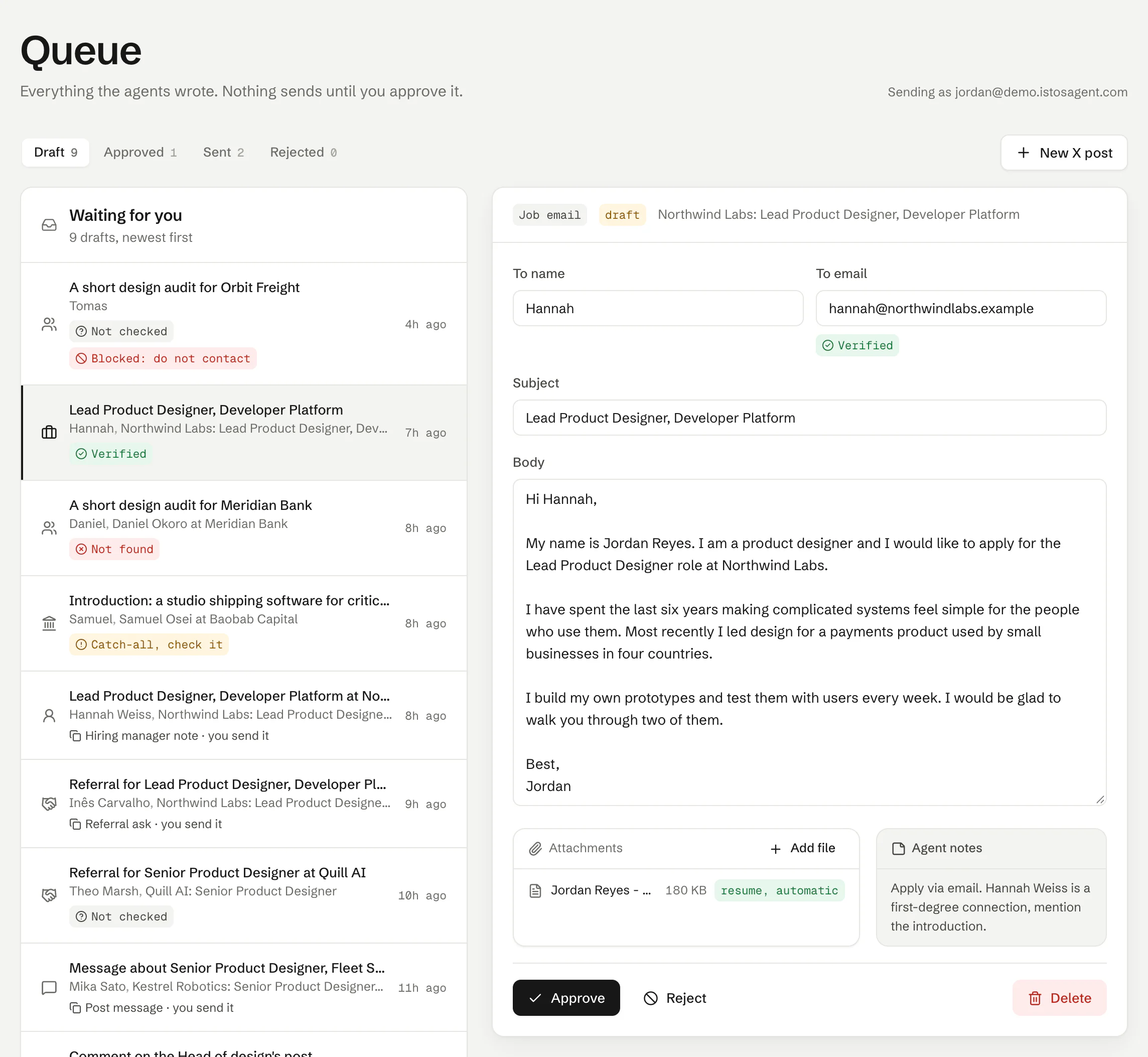
The queue on demo data. Drafts wait with their reasons; you approve, edit or reject.
On a normal morning I clear the queue in about as long as it takes to drink a coffee. Most drafts need a word or two. A few I reject. The ones I send are ones I'd have been happy to write myself.
What it costs you
Honestly, some speed. If your goal is to send as many applications or emails as possible this week, a tool that sends on its own will send more than Istos.
What you get back is control over the one thing that really is yours: what goes out under your name. I'd rather Istos did all the searching, checking and drafting, and left the last decision to you.
That's also why approving is free. Agent runs are the missions you launch, like scanning job boards or ranking a batch of leads. Reading, editing and approving drafts never count, on any plan. I don't want anyone skimping on the one step that protects them.
Let the agents do the searching
Istos is in private beta. Join early access, or try the free preview on your resume, your website or your raise first. Nothing sends until you approve it.