How to find companies and investors like the ones you name
Name a company you'd love to work for, a company like yours, or a customer you won. Istos finds others like it from its own role index and news, and shows why each one is on the list.
Most people find it easier to name one company than to describe a whole market. "Somewhere like Northwind Labs." "Investors who backed someone like Kijani Pay." "More customers like the last one." Istos takes you at your word: name it, and it finds others like it.
Each pipeline has this as its third tab, next to the list and Who you're after:
- Jobs: Companies like these. Up to three companies you'd love to work for. Istos finds up to twenty others like them that have open roles right now.
- Investors: Investors like yours. A competitor, or a company like yours. Istos lists who backed it, who backed companies like it, and who invests alongside them.
- Leads: Like your customers. Customers you've won. Istos finds companies like them that are raising, launching or hiring now.
Find companies like the ones you'd join
Open Companies like these
Open Jobs and choose the Companies like these tab.
Name up to three
Type a company's name or its domain in Company 1, and up to two more if you like. Or press a company under From your watchlist to use one you already follow.
Find companies
Press Find companies. A skeleton holds the place while Istos reads its index, usually a few seconds.
Read why each one fits
Each result has a similarity score out of 100, one line on why it's like the companies you named, how many roles it has open, the best match for your level with a tag such as One level down, and a recent news story when there is one.
Add the ones you'd join
Press Add to watchlist on any company you'd really join. From then on, Find jobs reads its board like the rest of your watchlist.
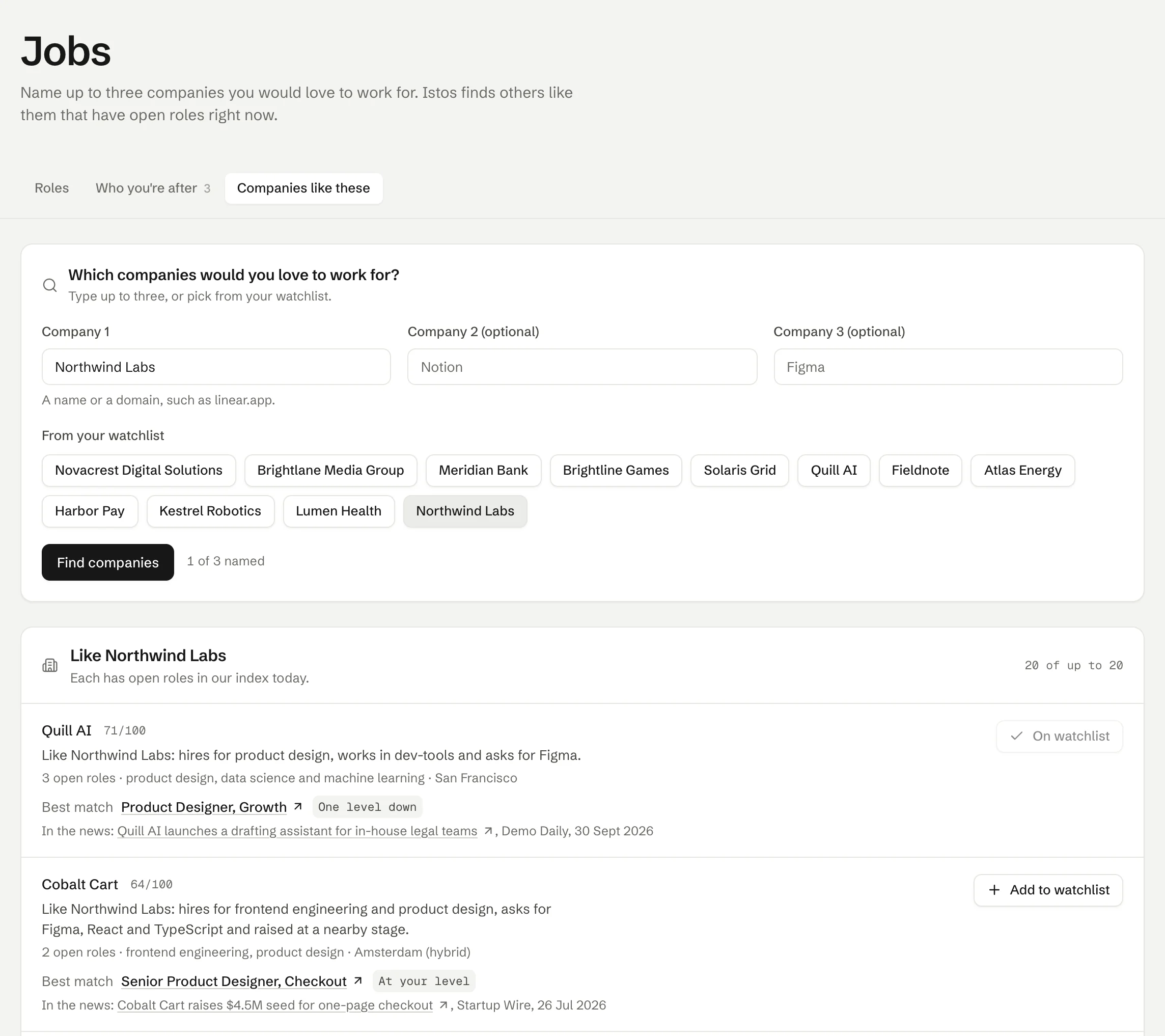
Jobs, then Companies like these. On demo data.
Every company on the list has open roles in Istos's index today. That's deliberate: a company like your favourite one is no use if it isn't hiring. If a company you named isn't in the index, it's marked Not in our index, and Istos works from the others.
Find investors like the ones who backed a company like yours
Open Investors like yours
Open Investors and choose the Investors like yours tab.
Name a company, pick a raise
Type a competitor or a company like yours in Company. If you've set up a raise, pick it in Raise: its sector and stage join the company's, and anyone you add goes to that raise.
Find investors
Press Find investors. Results come in three groups: who backed the company you named, who invests alongside them, and who backed companies like it, most recent deals first.
Check the source
Every investor comes from a funding story Istos holds, and the story is linked under each name, with its date, round and amount. Open it before you add anyone.
Add to investors
Press Add to investors on the ones that fit. They join your Investors list for that raise, with the funding story as their note, ready to be written to when you choose.
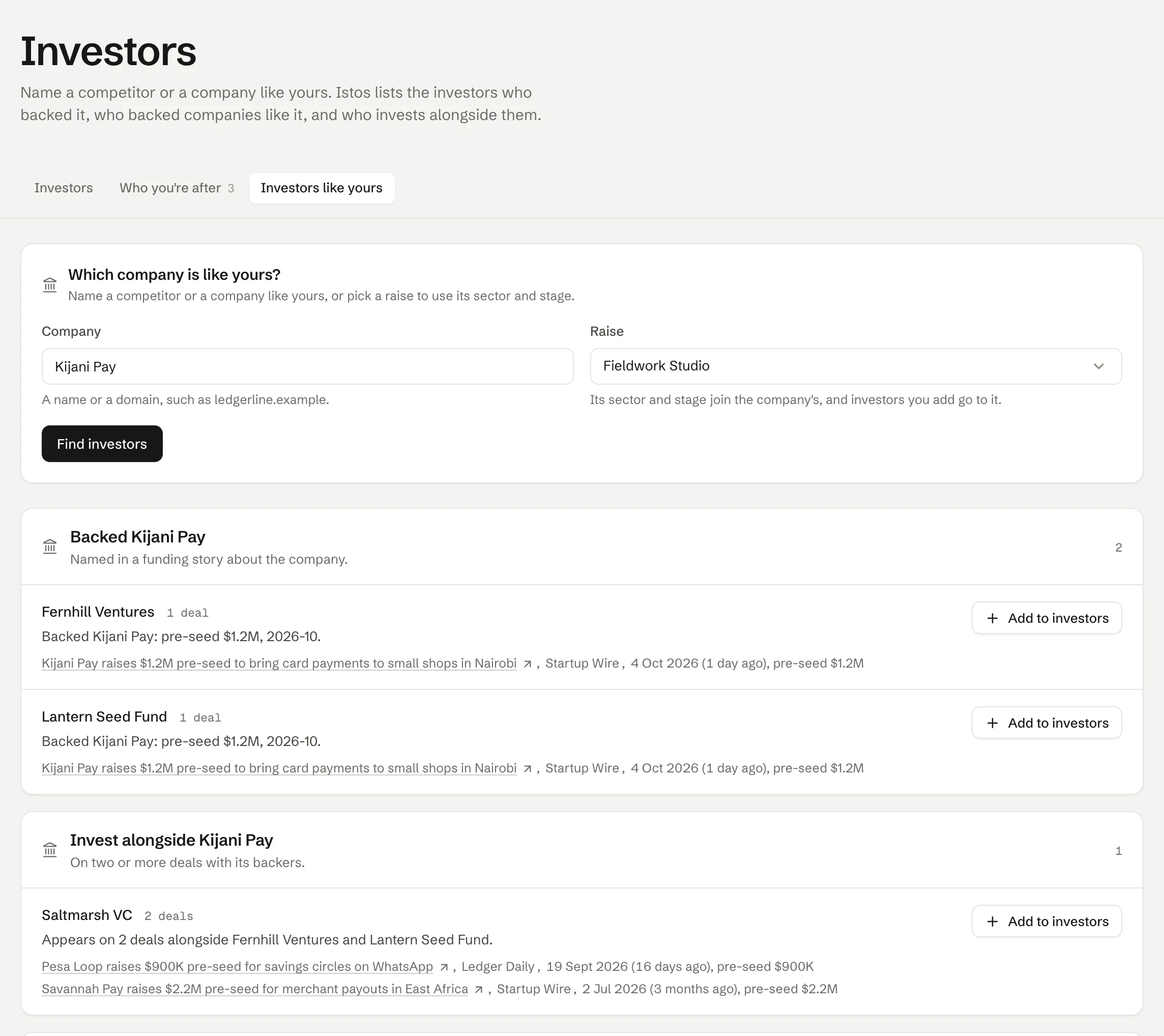
Investors, then Investors like yours. Every name links to the story it came from. On demo data.
Istos only lists firms named in stored funding stories, never private individuals, and it never guesses who invested.
Find companies like your best customers
On Leads, the Like your customers tab starts from customers you've marked as won on Customers, highest value first, then leads marked booked. Pick up to three, or type any company, and press Find companies. Each result is a company in a news story Istos holds, raising, launching or hiring, with a similarity score and the story itself. Tick the ones you want and press Add to prospect list.
Where the names come from
Everything here comes from data Istos already holds: its index of open roles from company job boards, and its table of tech news, from funding rounds to new offices. Similarity is worked out in plain code from what Istos holds about each company: the roles it has open (their families, skills, countries and how many) and the news about it (its field and funding stage). The why line under each result is built only from the things that scored.
When a model is connected, it may suggest extra names. They're only shown if Istos then finds that company in its role index with open roles today, or that investor named in a stored story. Those are marked Suggested by a model, so you always know which came from where. The note under the results says which way the list was made.
If something goes wrong
- "Not in our index." Istos doesn't have the company you named. Try its web address instead of its name, or name a similar company it does know.
- "We could not read the index just now." Nothing was lost. Press Try again in a moment.
- No look-alikes yet. Nothing in the index or the news is close enough right now. Try another company, or come back after the next news read; Istos reads the news every few hours.
- "Suggestions from a model are paused for an hour." You've used the hourly allowance for model suggestions. The list still works from Istos's own data.
Next: the email addresses for the people behind those companies, found with your own keys.
Let the agents do the searching
Istos is in private beta. Join early access, or try the free preview on your resume, your website or your raise first. Nothing sends until you approve it.