How to set up who you're after
Buyer segments for Leads, role families for Jobs and a thesis for each raise. How to get suggestions, check them, confirm the ones you mean, and what changes once you do.
Every pipeline in Istos has a tab called Who you're after. It's where you write down, in a few plain lines, who the search is for: the buyers your Leads agent looks for, the roles your Jobs agent looks for, the investors that fit each raise.
It's worth ten minutes, because everything downstream reads it. A lead that doesn't fit is set aside with the reason. A role in the wrong family never gets an application written. A first email opens on the problem that segment actually has, instead of a generic one.
What a segment holds
The three pipelines ask for slightly different things, each in the words that pipeline needs.
- Leads: buyer segments. A name, their pain, who decides, what marks them (up to three short tests), who's not a fit, companies like these, and countries if it matters.
- Jobs: role families. The family and level, target companies, what a role must have, what it should never be, where you can work, and whether you need visa sponsorship.
- Investors: a thesis per raise. Which raise it's for, why they would back it, stage and sectors, check size, geography, what they look for, who's not a fit, and companies they've backed like yours.
You can keep up to twelve in each pipeline.
Set them up
Open Who you're after
Open Leads, Jobs or Investors and choose the Who you're after tab next to the list. The count beside the tab says how many you have.
Press Suggest segments
Press Suggest segments. Istos builds suggestions from what you've already written. Without a model it does this in plain code from your briefs and notes; with a model connected, it writes a fuller answer from your website, documents and raises, and plain code tops it up. Or press Add a segment and write your own.
Read each suggestion
Suggestions arrive marked Suggested, and the line under the name says where each came from. Read the pain and the tests as if you were the buyer. Would they say "yes, that's us"?
Edit, then confirm
Press Edit to change any line, then Confirm. Only confirmed segments are used. Nothing is used until you confirm it, and suggesting again never overwrites a segment you've edited; new suggestions arrive as new cards.
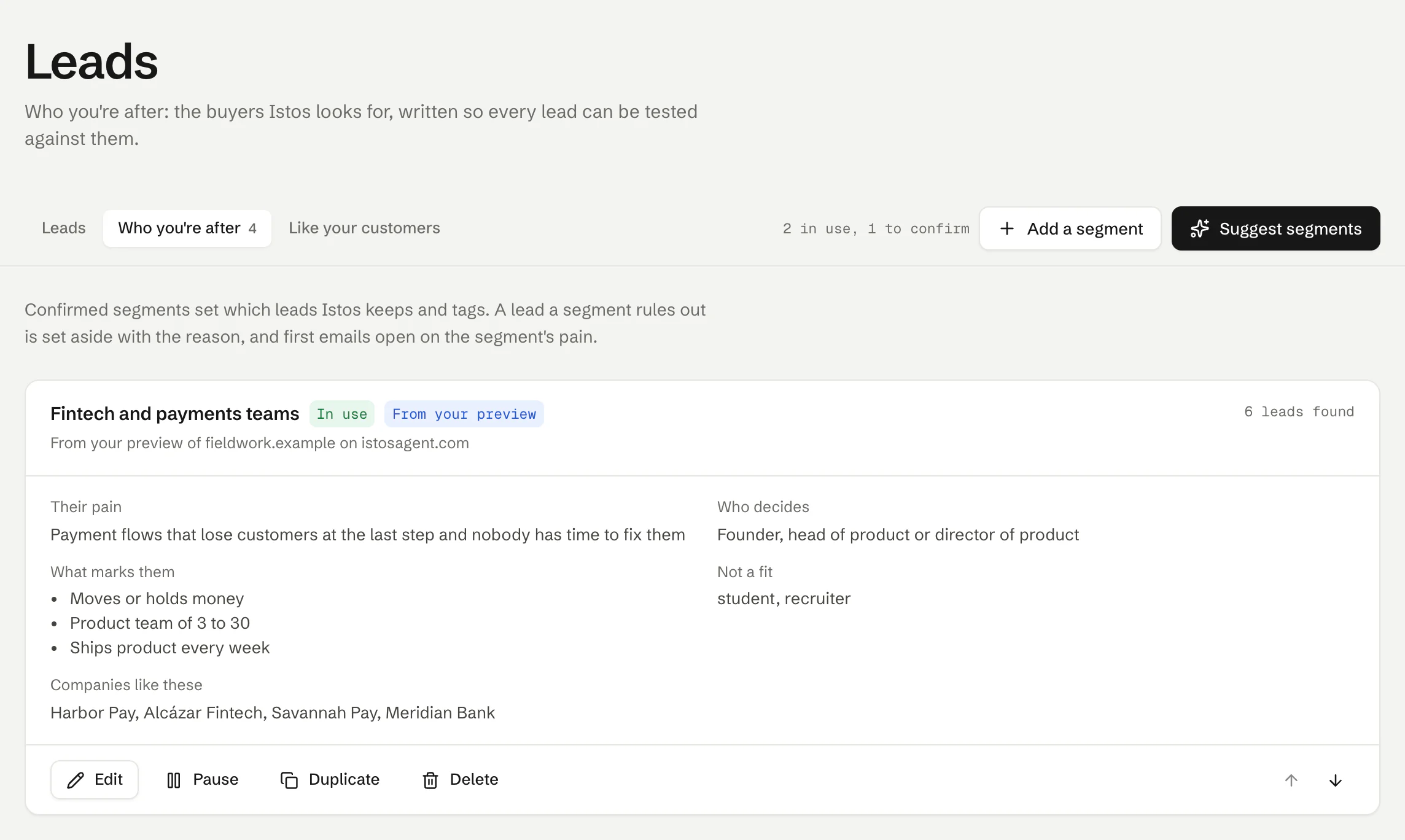
Leads, then Who you're after. On demo data.
Here's a suggestion still waiting for a decision. It names where it came from, so you know how much to trust it before you read it.
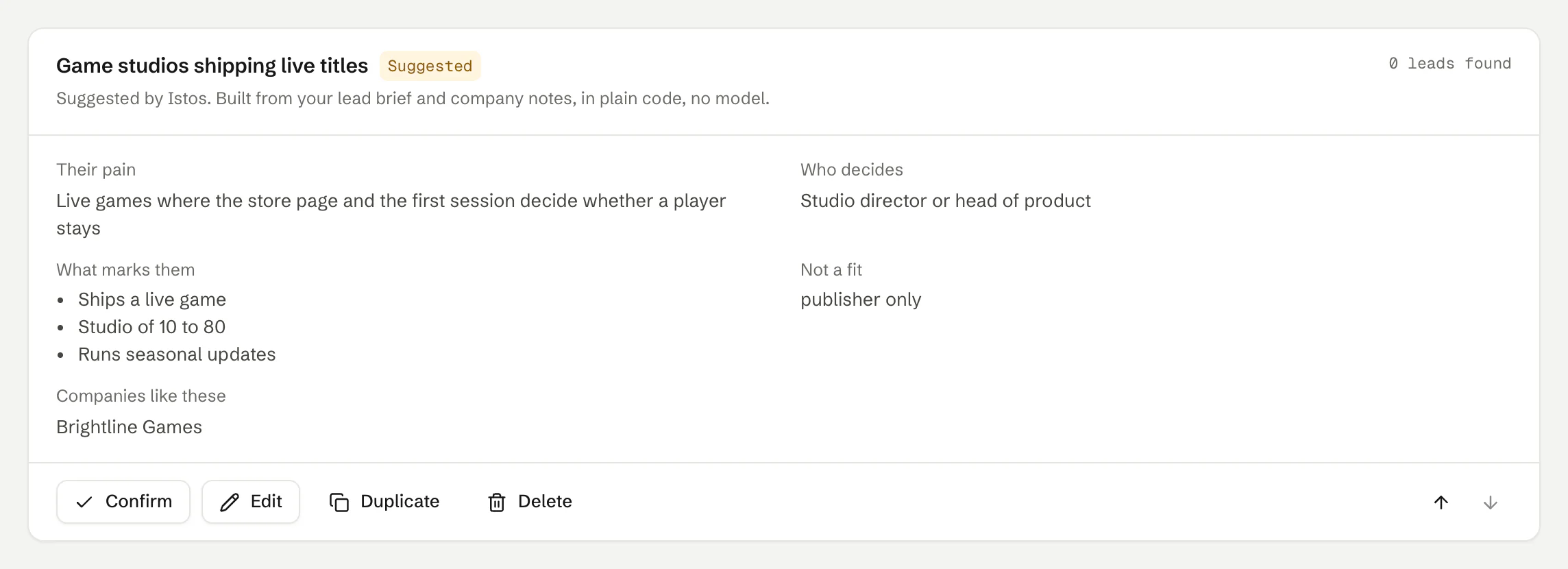
A suggestion waits, marked Suggested, until you confirm it. On demo data.
Write them so they can be tested
The tests under What marks them are the part that does the work, so make them things you could check from a website or a posting in a minute. "Moves or holds money" and "Product team of 3 to 30" are testable. "Innovative" and "growing fast" aren't.
The pain should be specific enough to open an email with. "Payment flows that lose customers at the last step" gives a first email something real to say. "Needs better design" doesn't.
And use Not a fit honestly. If you never want to write to recruiters or students, say so. The check runs in plain code: a lead that matches none of your segments and is ruled out by one of them is set aside, with the reason, so you're not paying a model to read it.
What changes once you confirm
- Leads. Confirmed segments decide which leads Istos keeps and tags. A lead that no segment matches and one rules out is set aside with the reason, and first emails open on the matching segment's pain.
- Jobs. Confirmed role families decide which roles Istos keeps and tags. A role that no family matches and one rules out is set aside with the reason, and applications are written for the family and level.
- Investors. Investors are tagged with the thesis they match, and each intro ties its one line about why them to that thesis.
Each card counts what it has matched so far, such as "6 leads found", so you can see which segments are pulling their weight.
Keep them tidy
- Pause a segment to stop using it without losing it. Resume brings it back.
- Duplicate copies one as a starting point for a near neighbour. The copy is paused until you resume it.
- Delete removes it, and whatever it tagged is untagged.
- The arrows on the right change the order, so the segment you care about most sits first.
If you used the free preview on the home page with your website, resume or raise, what it found can come with you when you join. Those segments arrive marked From your preview.
If something goes wrong
- "Could not suggest segments." Press Try again. If it keeps failing, write one yourself with Add a segment; suggestions are only a starting point.
- The suggestions are thin. Istos only uses what you've written. Add a lead brief, company notes or your website for Leads, or a job brief for Jobs, then suggest again.
- No new suggestions appear. You may already have twelve in that pipeline, or the new ones matched segments you already have. Delete or merge a few, then try again.
- "Give the segment a name." Every segment needs a name before it can be saved.
Next: finding more of the companies and investors you already know you like.
Let the agents do the searching
Istos is in private beta. Join early access, or try the free preview on your resume, your website or your raise first. Nothing sends until you approve it.