How to handle unsubscribe requests in cold email
Make saying no easy, act on it at once and never write to that person again. What a good opt-out looks like in a cold email, the one-click header mail apps use, and how Istos's do-not-contact list checks every step.
Every cold email you send is a small request for someone's attention. Some people will say no. How you handle that no says more about you than the email did.
The rules are simple to say and easy to get wrong in practice: make it easy to opt out, act on it straight away, and never write to that person again, whatever tool or list they turn up in next. This post covers what a good opt-out looks like, the header mail apps use for one-click unsubscribe, and how Istos keeps a do-not-contact list that's checked at every step.
It's practical advice, not legal advice. The rules for cold email differ by country, so check the ones that apply to you.
Make saying no easy
The kindest cold email is one that's easy to ignore and easy to refuse. A clear way out lowers the cost of reading it, and it protects you too. Someone who can't find how to opt out has one button left: report as spam. Enough of those and your emails stop arriving for everyone.
Two things make it easy:
- A plain line at the end. No legal boilerplate, just a sentence that sounds like you. For example: "If you'd rather not hear from me, reply 'no thanks' or use this link."
- The unsubscribe header. Mail apps read two headers, List-Unsubscribe and List-Unsubscribe-Post, and use them to show their own unsubscribe button next to the sender's name. Gmail's email sender guidelines (opens in a new tab) say that senders of more than 5,000 messages a day to Gmail accounts must support one-click unsubscribe in their marketing and subscribed messages. Even if you're nowhere near that, the header costs nothing and gives people a no that doesn't involve the spam button.
Act on it at once
When someone opts out, three things should happen straight away:
- Nothing else goes to them. Not the follow-up you'd scheduled, not the email from your colleague, not next quarter's campaign.
- Anything already written for them is dropped.
- They go on a list that every future email is checked against.
Replies are the tricky part. People rarely use the exact word "unsubscribe". They write "please take me off your list", "not interested, don't email again", or a single "stop". Read for the meaning, not the keyword. When in doubt, treat it as a no.
How Istos handles it
Every email carries the unsubscribe header
Every email Istos sends from your account, whatever kind it is, carries the List-Unsubscribe headers, with a one-click link and a reply address. When someone uses their mail app's unsubscribe button, the app posts to that link and they're opted out of your emails at once.
A link checker or a security scanner that merely opens the link changes nothing. Opening the link shows a page, Stop these emails, with a button. Only pressing it, or the mail app's own one-click request, opts the person out. That keeps automated scanners from unsubscribing people who never asked.
Lead emails end with a line you can edit
Cold emails to leads can also end with a plain opt-out line. It's on by default. Open Settings, then Cold email opt-out:
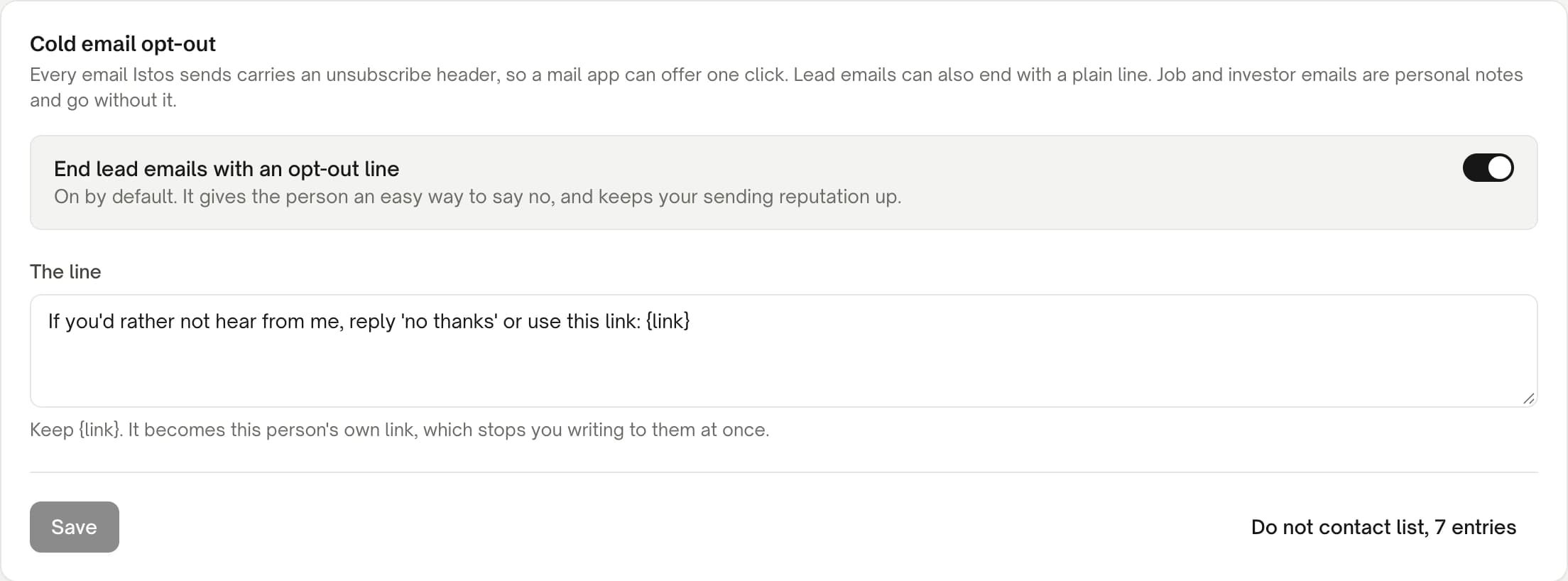
Cold email opt-out in Settings, on demo data.
Keep the line on
End lead emails with an opt-out line is on unless you turn it off. It gives the person an easy way to say no, and keeps your sending reputation up.
Write it in your words
Edit The line so it sounds like you. Keep
{link}in it: it becomes that person's own opt-out link. Istos won't save a line without it, or one over 400 characters.Save
Press Save. The line is added as each lead email is sent, with that person's own link, so every lead email from now on ends with it.
Job applications and investor emails go without the line, on purpose. They're one-to-one personal notes, and a footer would read oddly in an application. They still carry the header.
One list, checked four times
Open Settings, then Do not contact. These are the people and domains Istos never writes to for you. You can add them yourself, one per line or pasted from a spreadsheet, import a CSV or text file, search the list and export it. Each entry keeps its reason: Asked to stop, Not interested, Bounced hard, Added by you or Opted out through Istos. A domain covers everyone at it, and its subdomains.
The list is checked at four points:
- Before a draft is written. The run log says "Skipped: on your do-not-contact list" and moves on.
- Before a paid lookup. Istos won't spend your email finder's credits on someone you've agreed not to contact.
- In the queue. A draft to someone on the list is badged, and you can't approve it.
- Again before anything sends. The last check, right before the email leaves, in case the list changed in between.
When someone is added, anything still waiting for them in your queue is rejected.
Replies that say stop
If you connect Gmail, Istos reads the replies to what it sent. A clear request to stop adds the person to your list, rejects anything waiting for them, and marks the lead lost or the investor passed. Plain phrases are recognised in plain code first. "Not interested right now" is treated as a not now, not a stop, so it's flagged for you rather than added.
Opting out of every Istos account
Someone who gets an email from one person using Istos can also opt out of all of them. The public page at istosagent.com/opt-out asks for their address and emails a confirmation link that works once and expires in 24 hours. Once they confirm, the address is suppressed for every Istos account, stored only as a one-way hash, so the list itself never holds the address in plain text. The page gives the same answer for every address, so it can't be used to find out who is in anyone's contacts.
A few habits that help
- Honour no from anywhere. A reply, a LinkedIn message, a word at a conference. Add them to the list yourself.
- Use domains when it's the company saying no. If a founder says "we're not looking at this, please don't contact the team", add the domain.
- Don't argue with an opt-out. No "sorry to see you go" email. Silence is the respectful answer.
- Export the list now and then. It's yours, and it should travel with you if your tools change.
For the address side of the same discipline, see how to find verified email addresses with your own keys. For what goes in the email above the opt-out line, see how to write a first email a founder will answer.
If something goes wrong
- "Keep
{link}in the line." The opt-out line needs{link}so each person gets their own link. Put it back where you want the link to go. - "Use a comma, a full stop or brackets instead of a dash." The line can't contain long dashes. Rephrase it.
- A draft can't be approved. The recipient or their domain is on your do-not-contact list. Open the list to see why, and remove the entry only if you're sure they'd welcome the email.
- Replies aren't being read. Reading replies works through a connected Gmail inbox. With your own mailbox connected for sending, add opt-outs that arrive by reply to the list yourself.
Let the agents do the searching
Istos is in private beta. Join early access, or try the free preview on your resume, your website or your raise first. Nothing sends until you approve it.