How to find jobs that sponsor visas
Where to check whether an employer really sponsors work visas, using the official lists for the UK, the US, Canada and Ireland, what a posting's wording tells you, and how Istos marks every role with both.
If you need a visa to work in a country, most of the job search is wasted until you know one thing: will this employer sponsor you? A lot of postings don't say. Some say "sponsorship available" and mean it. Some bury "must already have the right to work" in the last paragraph.
There are two places to look for an answer: what the posting itself says, and the official lists governments publish of employers who have sponsored before. This post shows how to read both, where each list comes from, and how Istos puts the answer on every role so you don't have to check by hand.
Read the posting for "no" first
Postings are written by people, so the same answer comes out in many ways. The no's are easier to miss than the yes's, so start there. All of these mean the company won't sponsor you:
- "We are unable to sponsor visas for this role."
- "Visa sponsorship is not available."
- "Candidates must already have the right to work in the UK."
- "You must be authorised to work in the US without current or future sponsorship."
And these mean it will, or at least that it's open to it:
- "Visa sponsorship is available."
- "We sponsor Skilled Worker visas."
- "We offer relocation and visa support."
Order matters. "Visa sponsorship is not available" contains the words "visa sponsorship", so if you only skim for the yes, you'll get it wrong.
Check the official lists
Some governments publish who has sponsored, or is licensed to sponsor, foreign workers. These are the four Istos reads, all from the governments' own sites:
- United Kingdom: the register of licensed sponsors (workers). Published on GOV.UK and updated often. An employer has to hold a sponsor licence to sponsor a Skilled Worker visa, so this is the strongest of the four. It lists about 126,000 employers.
- United States: USCIS H-1B employer data. Employers with H-1B approvals, about 82,000 of them. USCIS's downloadable files stop at fiscal year 2023, so this list is useful but not current.
- Canada: employers with a positive LMIA. Published quarterly on Canada's open data portal. A positive Labour Market Impact Assessment is usually the step before hiring a foreign worker. About 26,000 employers, from the four newest quarters.
- Ireland: employment permits issued to companies. Published by the Department of Enterprise, year to date. About 7,700 employers.
You can search each one yourself. Two things trip people up:
- Names don't match exactly. "Monzo Bank Limited" on the register is "Monzo" on the job board. Search for the distinctive part of the name.
- A match is a sign, not a promise. An employer on the UK register can sponsor. Whether it will for this role, at your level, is a question for the recruiter. Ask early, in one line, before you spend an evening on the application.
Set it up in Istos
Istos reads the posting and checks the lists for every role it finds. It checks the governments' own sites for new versions every morning, and a list that fails to download keeps its last good copy rather than going half empty. You only need to tell it where you need a visa.
Open Settings, then Job filters, and scroll to Visa and relocation.
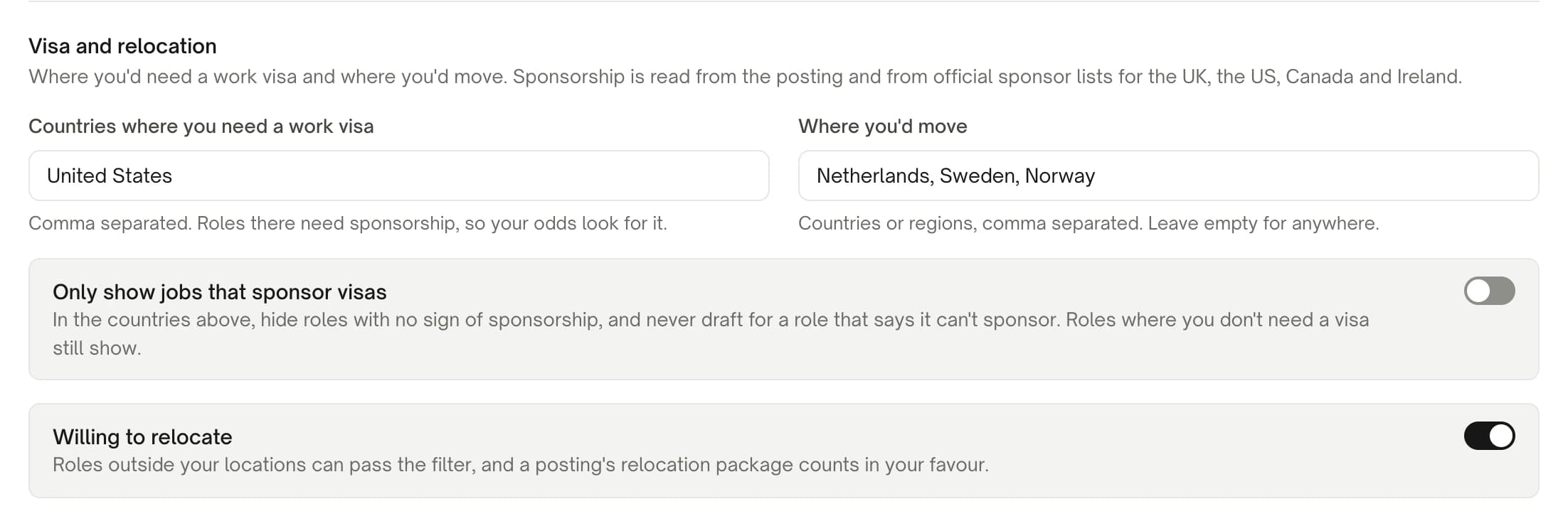
Visa and relocation in Job filters, on demo data.
Name the countries where you need a visa
Under Countries where you need a work visa, list them, comma separated. Roles in those countries now need sponsorship for your odds to look good.
Say where you'd move
Where you'd move is a list of countries or regions. Leave it empty for anywhere. Turn on Willing to relocate so roles outside your usual locations can pass the filter, and a posting's relocation package counts in your favour.
Decide how strict to be
Only show jobs that sponsor visas hides roles in your visa countries that show no sign of sponsorship, and Istos never drafts for a role whose posting says it can't sponsor. Roles where you don't need a visa still show. Leave it off if you'd rather see everything and judge for yourself.
Save and run Find jobs
Press Save filters, then Find jobs on the Jobs page. The government job banks are searched only in countries you can work in or would move to, using the titles under Roles to search job banks for.
Read the visa badge on each role
Every role in a country where you need a visa carries one of these, in words first and colour second:
- No sponsorship, in amber, when the posting says it can't sponsor. This wins over everything else: if the posting says no, a register match doesn't change it.
- Sponsors visas · on the UK register, or on US H-1B records, on Canada's LMIA list, or on Ireland's permit records, when the employer's name matches the list for the role's own country. Hover the badge to see the name exactly as the register writes it.
- Sponsors visas · says so in the posting, when the posting offers it and no register matched.
A UK role is only checked against the UK register, and a Canadian role against the LMIA list. A company on the H-1B records doesn't get a sponsor badge for its Berlin office.
On the Jobs page, the Any sponsorship and Sponsors visas toggle above the list narrows the open roles to the ones with a green badge.
How it changes your odds
Each role's Your odds key reads strong, fair or low, and visa is one of the reasons. When a role is somewhere you need a visa:
- A register match or a posting that offers sponsorship counts as a plus.
- No sign either way counts as a minus.
- A posting that says it can't sponsor is a hard stop: your odds read low, whatever else is true.
You'll never see a percentage. How to find roles that actually fit your level explains the other reasons that go into the odds.
How the names are matched
Company names on job boards and on registers rarely agree, so Istos matches them in plain code after dropping the legal endings ("Ltd", "Limited", "Inc", "plc", "GmbH" and the like) and reading "&" as "and". A shorter version of a name only counts when it's distinctive and only one employer on that register shares it. That keeps a common word from matching half the list. If you think a match is wrong, hover the badge: it names the employer as the register writes it, so you can check.
If something goes wrong
- No visa badge at all. The role isn't in a country you listed under Countries where you need a work visa, or neither the posting nor a register said anything. Check the spelling of the country in Job filters.
- A sponsor badge on a role that says "right to work required". It shouldn't happen: the posting's no always wins. If you see it, the wording is one Istos didn't recognise. Trust the posting, and tell us so we can add it.
- Your country isn't one of the four. Istos only uses official lists published as a file or an API. The Netherlands, for one, publishes its recognised sponsors as a web page only, so it isn't read. Postings that mention sponsorship still get the posting badge.
Once a role passes, check that it's real: how to spot a fake job posting. Then look for a warm way in with the warm path.
Let the agents do the searching
Istos is in private beta. Join early access, or try the free preview on your resume, your website or your raise first. Nothing sends until you approve it.