How to use startup funding news to find jobs before they're posted
A company that just raised usually hires next. How to read funding and hiring news as a job seeker, watch the companies' own job boards, and turn the story into a first line when a role opens.
By the time a role shows up on a big job site, hundreds of people can see it. The few weeks before that are quieter. A company raises a round, announces a launch or says it's building a team, and only then writes the job ads.
If you notice the news, you can be there early: watching the company's own job board, ready when the role goes up, with something true to say in your first line. This post shows how to do that by hand, and with Istos's News page and watchlist.
It's a way to be early, not a promise. Not every company that raises hires for your role, and some never post the job at all. But it puts your effort where hiring is most likely to happen next.
Why funding news works for a job search
When a startup announces a round, it usually says what the money is for: building the product, growing the team, entering a new market. Hiring is almost always part of it. A launch or a new market often means support, sales and marketing roles. A post saying "we're hiring our first designer" says it outright.
That gives you two things the job boards don't:
- Time. You know where to look before the roles are everywhere.
- A reason to write. "Congratulations on the Series A, I saw you're building out the design team" is a better first line than "I'd like to apply for the role".
Read the news for your field
Open News in Istos. It reads a set of public tech and industry news feeds every three hours and sorts each story by what happened and which field it's in. As a job seeker, start here:
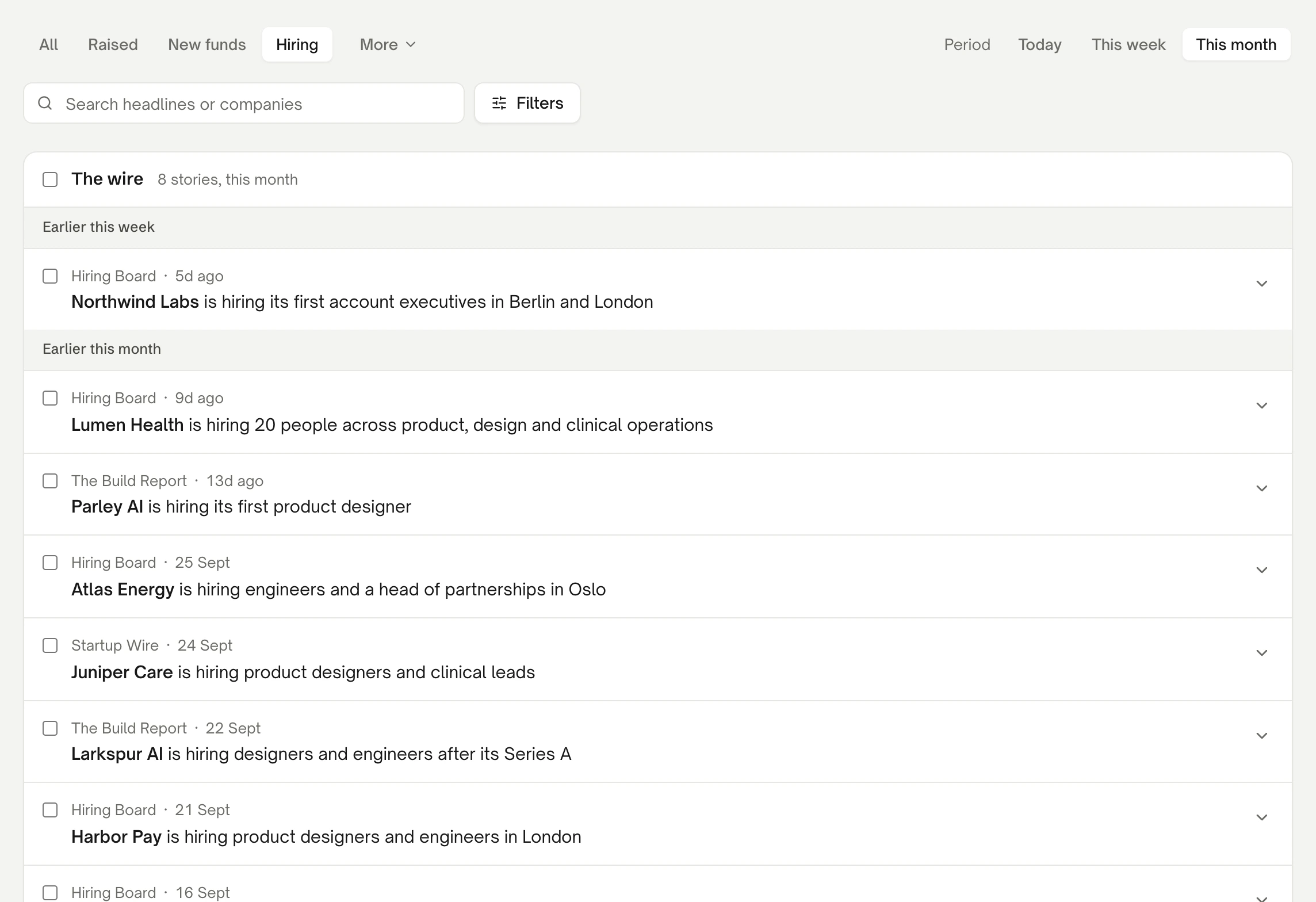
News filtered to Hiring over the last month, on demo data.
- Hiring shows companies saying they're building a team. This is the most direct signal.
- Raised shows new rounds. Read what the money is for.
- Launches, under More, shows new products and new markets.
- Filters narrows by field, such as fintech, health, AI or climate, with an Africa filter for African sources and markets.
- This month gives you enough stories to see a pattern. Today is for checking in.
Open a story to read its summary, and Read the article to see the source. The full article usually says more about the plans than the headline does: which teams are growing, and where.
Watch the companies you'd join
When a company looks right, don't just make a note. Put it where you'll see its roles the moment they're posted.
- Tick the story and press Add to list, to keep it on a prospect list, such as "Raised, fintech, October".
- Open the list from Lists on the board, and press Watch next to the company.
Watch puts the company on your jobs watchlist. Istos looks for its job board on Greenhouse, Lever or Ashby, and when it finds one, tells you how many roles are open. From then on, every time you run Find jobs, Istos reads that board and the company's own careers pages, and new roles show up on your Jobs page with the same checks as everything else: where they're verified, how fresh they are, any red flags, and what they say about visas.
You can also add a company straight to the watchlist from Jobs, with Add on the watchlist card. How to find jobs on company career pages covers the watchlist in full.
When a role opens, lead with the news
Open the role on your Jobs page and look at its warm path. The third part, Something worth saying, lists the company's recent news from Istos's feed, from the last six months: a raise, a launch, a new office, a hiring push. Each comes with its source and date, and a hint on how to use it.
The timing line at the top of the warm path uses it too. A role posted in the last two days says to reach out today. Otherwise, when the company raised, launched or announced hiring in the last two weeks, it says so, with the date, and suggests a note now, while it's fresh. When a role is more than two weeks old, it says a shortlist may already be forming, so go to the hiring side directly and keep it short.
That's where the work you did earlier pays off. You've read the story. You know what the company's building. Your first line can be about them, not about you. How to use the warm path on a job walks through all four parts, and how to find the hiring manager for a job covers who to send it to.
A weekly rhythm
- Monday, ten minutes. Open News, filter to Hiring and Raised for This week, in your field. Add the companies you'd join to a list, and Watch the best few.
- During the week. Run Find jobs a few times. New roles from watched companies show up in Recommended when they're fresh and pass the checks.
- When one fits. Open its warm path. Lead with the news, find who the role reports to, and send a short note around the same time as your application.
Keep the watchlist small enough that every company on it is one you'd be glad to join. Ten good ones beat fifty you're lukewarm about.
If something goes wrong
- No stories in your field. The feeds cover tech and a handful of industries, not everything. Widen the period to This month, or clear the field filter.
- Watched, but no open roles. Either the company has nothing open yet, or it isn't on Greenhouse, Lever or Ashby under a name Istos could find. If you know its board, set it on the watchlist card on Jobs. Either way, Istos still reads the company's own careers pages on each run.
- The company raised but posts no roles. Some companies hire through referrals first. Look at People you know there on any of its roles, or check back after the next run.
- No openers on a role. Istos hasn't seen news about that company in the last six months. Use what the posting itself says instead.
Let the agents do the searching
Istos is in private beta. Join early access, or try the free preview on your resume, your website or your raise first. Nothing sends until you approve it.