How to try Istos without signing up
Paste your website, upload your resume or describe your raise, and watch Istos work through six steps in front of you. What each path finds, what it keeps, what it never stores, and how to carry the result into an account.
Istos is in private beta, so most people can't open the app yet. You can still see what it does with your own material, today, without an account. The preview on the home page runs a short version of each agent in front of you and shows its work as it goes.
This post covers the three ways in, what each one finds, what Istos keeps and for how long, and what's different once you have an account.
Where to find it
Go to istosagent.com. The preview is the first thing on the page. Pick what you'd like Istos to look at:
- A website. Your company's address. Istos works out who might buy from you.
- A resume. A PDF or Word file up to 2 MB, or the text pasted in. Istos finds live roles that fit.
- A raise. Your sector, your stage and the amount, such as $500k or $2M. Istos finds funds that back companies like yours.
Press go, and you're taken to a page of its own where the run happens.
Watch the six steps
Each path has six steps, run in order. The page shows a tracker across the top, the step at work, and, on the left, what each finished step found, with the agent's log under the current one.
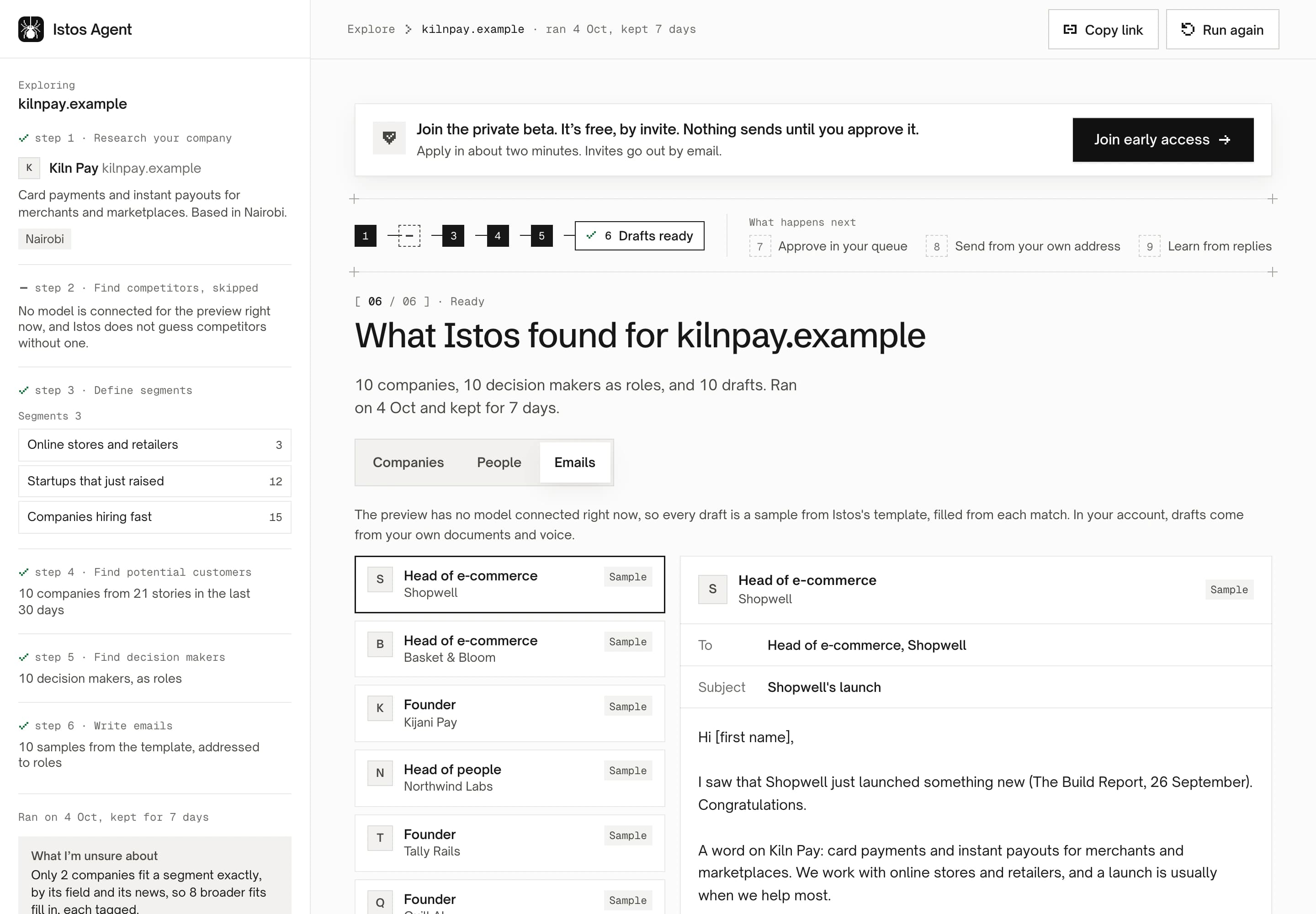
A finished website preview, for a fictional company on demo data.
A website
- Research your company. What the site says you sell, and where you're based.
- Find competitors. Who else does what you do.
- Define segments. Two or three kinds of buyer, each with the pain it has and how many such companies Istos holds in its news and role index.
- Find potential customers. Real companies from recent news that fit those segments: ones that raised, launched or are hiring.
- Find decision makers. The role that usually buys, at each company.
- Write emails. A first email to each, addressed to the role.
A resume
- Read your resume. Your current title and your level, and where they came from.
- Role families. The kinds of role you fit.
- Target companies. Companies hiring for them.
- Live roles. Open roles from Istos's index of company job boards, at your level first.
- Hiring managers. The role that usually hires for each kind of job, named as a role.
- Cover notes. A short note for each role.
If the level it read is wrong, Not right? Change lets you pick your level and field, and match again.
A raise
- Read your raise. Your sector, stage and amount.
- Your thesis. The kind of investor who backs companies like yours.
- Matching funds. Funds at your stage, from funding news Istos holds.
- Recent deals. What those funds backed lately.
- Partners. The role at each fund that covers a raise like yours.
- Intro emails. A short intro to each.
Exact first, then the nearest
The preview tries to match you exactly: a senior product designer sees senior product design roles, a pre-seed raise sees pre-seed funds. When fewer than five fit exactly, it fills in with the nearest, and tags each one so you can see why it's there, such as One level up, Nearby stage or Broader fit. The box headed What I'm unsure about says, in one sentence, where it had to stretch.
It also tells you when it skipped a step and why. When no model is connected to the preview, for example, it skips finding competitors rather than guess at them, and the drafts are samples from a template, filled from each match. Each one is then marked Sample, and the Emails tab says so above the list.
What Istos keeps, and what it doesn't
- No names. People appear only as roles: "Head of e-commerce, Shopwell", not a person. Drafts open "Hi [first name]".
- Your resume isn't stored. It's read in memory to find your title, level and skills. Only what was derived from it is kept. If your name is read to sign the cover notes, it's sent to your browser only and never saved.
- 7 days. Results are kept for a week, and reopen as they finished. Run again starts fresh.
- Who can see it. A website result has a page at its own address, so you can share it. A resume or a raise result has a private, random link that isn't derived from anything you entered. Result pages ask search engines not to index them.
To keep the preview fair for everyone, each visitor can run a few an hour and a few more a day.
What changes in an account
The preview is a short, public version. Inside an account, the same agents work from much more:
- Your own words. Drafts come from your documents, your resume, your voice rules and your knowledge base, not a template.
- Real people. You add the people you want to reach, or import your LinkedIn connections on Pro, and find their addresses with your own email finder accounts.
- Every check. Jobs are vetted against the company's own site, for freshness, red flags and visa sponsorship. How to spot a fake job posting shows what's checked.
- Your approval. Nothing sends until you approve it, from your own address.
When you join, Use what we found carries the preview's segments, role families or thesis into your account, marked From your preview, so you don't start from nothing. How to set up who you're after picks up from there.
If something goes wrong
- "Write the amount like $500k or $2M." The raise path needs an amount it can read. Use a number with k or M.
- The resume path read the wrong level. Press Not right? Change, pick your level and field, and match again.
- A step says skipped. It says why under the step. Usually there was nothing in Istos's index or news that fit yet, or the step needs a model.
- You've hit the limit. Wait an hour and try again. Your earlier results are still at their links for 7 days.
Let the agents do the searching
Istos is in private beta. Join early access, or try the free preview on your resume, your website or your raise first. Nothing sends until you approve it.