How to use funding news to find your next customers
A company that just raised, launched or started hiring has a reason to buy this month. How to read the news as a list of buyers, pick the ones worth writing to, and keep them in one place with the News page and prospect lists.
Cold outreach is mostly a timing problem. The same email that gets ignored in March gets a reply in June, because in June the company had just raised a round and had a plan to spend it.
Funding news is the most public version of that timing. When a company announces a raise, it's telling you three things at once: it has money, it has a plan for what comes next, and that plan usually includes hiring and buying. Launches, new contracts and hiring pushes say something similar.
This post covers how to read the news as a list of buyers, and how to do it in Istos with the News page and prospect lists, so you're not keeping a spreadsheet of headlines by hand.
Why news works as a buyer list
Most lists of companies are a snapshot: every fintech in Lagos, every robotics firm with 50 to 200 people. They're accurate and they're cold. Nothing about them says this month is different.
News is the opposite. It's a short list of companies where something changed this week. The change gives you both the reason to write and the first line of the email: "Saw you raised your seed round last week" beats "I hope this finds you well" every time, as long as it leads somewhere relevant to them.
A few kinds of story are worth watching for:
- Raised. New money, usually with a plan to hire and build. The best single signal for most services.
- Hiring. A first sales hire, a new office, a team being built. They'll need tools, help and process.
- Launches. A new product or a new market. Expect a push on marketing, sales and support.
- Contracts. A large customer won. Delivery is about to get harder.
- New funds. Useful if you're raising. A new fund means a partner with fresh money to deploy.
Where Istos gets its news
Istos reads a fixed set of public news feeds every three hours: TechCrunch and its venture and startups feeds, Crunchbase News, Sifted, TechCabal, Disrupt Africa, Defense News, Breaking Defense, The Robot Report, Modern Retail, Retail Dive and Hacker News Jobs. It reads only what each feed publishes, and every story links back to its source.
Each headline is sorted by plain rules into what happened (raised, new fund, hiring, launch, acquisition, contract, people move, layoffs) and which field it's in (defense, manufacturing, robotics, e-commerce, fintech, AI, climate, health or tech), with an Africa filter for stories from African sources or about African markets. The amount and the round are read from the story when it states them. A story the rules can't place stays under All, rather than being guessed into a type.
Read the board
Open News from the sidebar. The board at the top shows the latest raise, how many companies raised this week, how much money that adds up to, and how many new funds were announced. A ticker runs the newest headlines underneath. Pause it with the key on its left if it's distracting.
Under the board is The wire: every story, newest first, grouped by day. You narrow it with three controls:
- What happened. All, Raised, New funds and Hiring, with Launches, Acquisitions, Contracts, People moves and Layoffs under More.
- When. Today, This week or This month.
- Where and what. A search box for headlines or companies, and Filters for the field.
Pick the stories and keep them
When a story fits, tick it. A bar appears above the wire with how many you've picked, a list to put them in, and Add to list. Choose New list... to start one, give it a name you'll recognise later, such as "Seed fintech, October", and press Add to list.
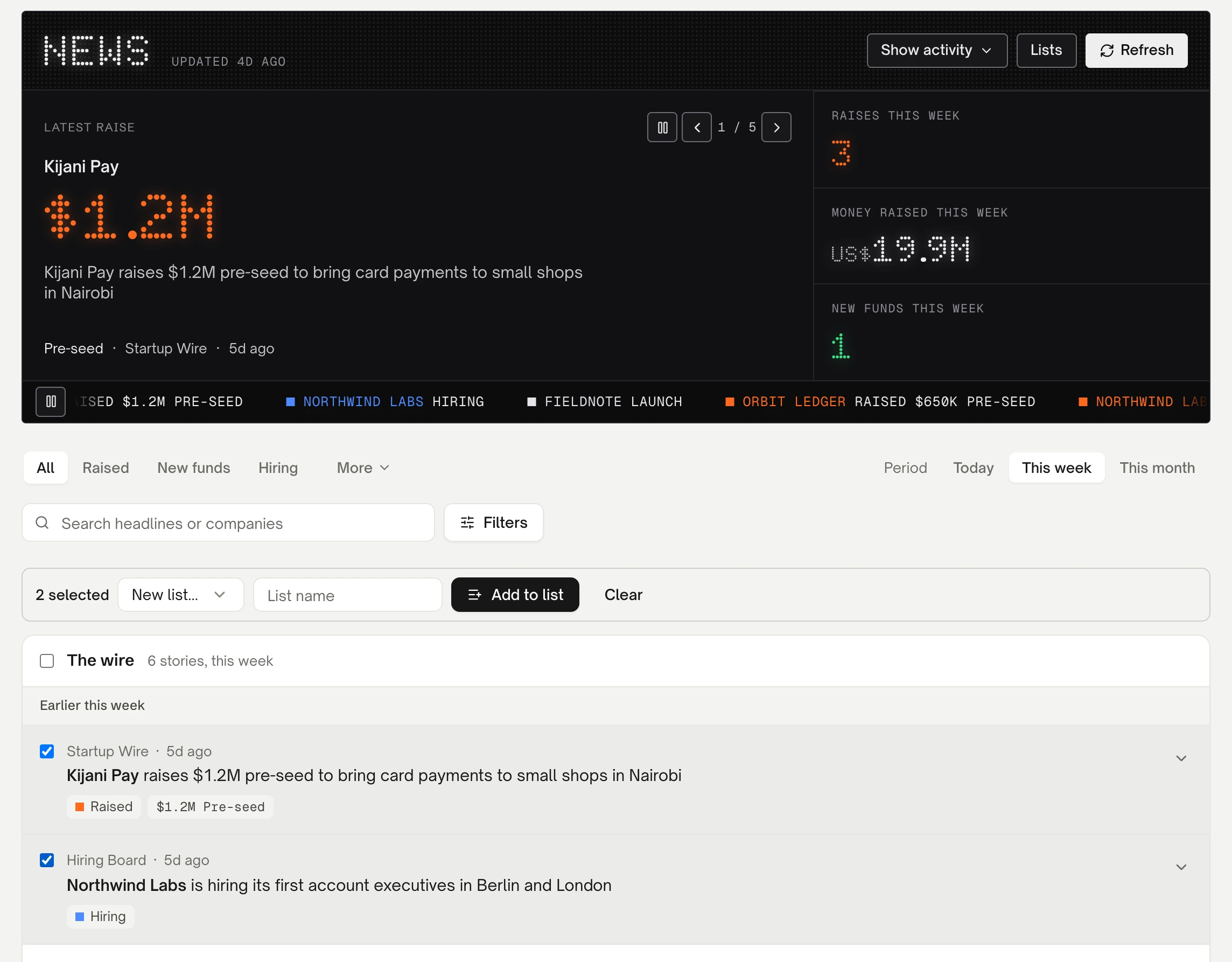
The News page on demo data, with two stories picked for a list.
Your lists live under Lists on the board, at Prospect lists. Each company in a list has a status you can move it through, New, Researched, Contacted and Replied, and a note. If you've set up who you're after, each company is also tagged with the buyer segment its story fits.
Move the good ones on
A list is a shortlist, not a pipeline. When a company is worth pursuing, each row has two keys:
- To Leads adds the company to your Leads, marked as coming from the news, in the segment it was tagged with.
- Watch adds it to your jobs watchlist, if you'd like to work there rather than sell to it. When Istos finds open roles on the company's board, it tells you how many.
From a company to a person
A raise announcement names a company. Your email goes to a person. The story itself often helps: the founder quoted in it, the new head of sales named in it, or the investor who led the round.
When you know who to write to, open Leads, choose Add leads, then Add one by hand, and enter their name, company, role and the company's website. Find email then looks up their work address with your own Hunter, Prospeo or LeadMagic account, and checks it before anything is sent. Istos never guesses an address from a name pattern. How to find verified email addresses covers setting the finders up.
Write to the change, briefly
The story is your opening line, not your pitch. A good first email after a raise:
- names the news in a few words, without flattery;
- connects it to one thing you do that matters more now than last month;
- asks one small question.
How to write a first email a founder will answer goes through the shape in detail. Like everything in Istos, that email waits in your queue until you approve it.
Find more like the ones that work
Once you've won a customer or two, you can turn this around. On Leads, the Like your customers tab starts from the customers you've won and looks for companies in the stored news that are like them and are raising, launching or hiring. How to find companies and investors like the ones you name walks through it.
If something goes wrong
- "No news yet." Istos hasn't read the feeds yet. Press Refresh on the board, or come back after the next three-hourly read.
- "Nothing matches." The filters are too narrow. Widen the period to This month, or clear the field filter.
- A story has no type. The headline didn't match a rule, so it's only under All. It's still worth reading.
- To Leads adds the company, not a person. That's by design: the news names companies. Add the person by hand when you know who it is.
Let the agents do the searching
Istos is in private beta. Join early access, or try the free preview on your resume, your website or your raise first. Nothing sends until you approve it.